Booking Online
How to Book a Product Inspection in China Online, Step by Step
Booking an inspection used to take a chain of emails: one to ask for a quote, one to send the factory address, one to agree the sample size, one to send proof of payment, and a few more to chase the date. SSTI's client portal puts all of that into one booking form. A first booking takes about three minutes, including creating a free account. Repeat bookings are quicker still, because the factory is already in your address book. This guide walks through the four steps, with screenshots of the real booking pages.
- What to have ready before you start
- The four booking steps, with screenshots of each page
- What happens between booking and the inspection day
Before You Start: What to Have Ready
You need four things. First, the factory's name and address, with a contact person and phone number. Second, the product, its style or item numbers and the order quantity. Third, the date you would like the inspection — for a pre-shipment inspection, when production is at least 80% finished and packed. Fourth, if you have them, your checklist, drawings or photos of the approved sample. These can also be uploaded after booking, so they do not hold anything up.
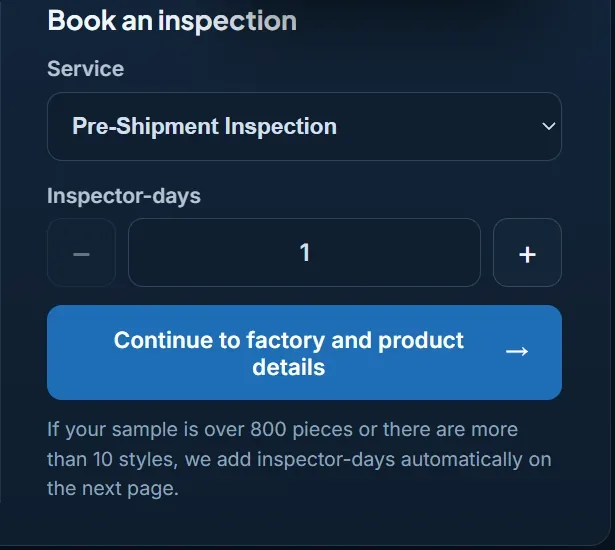
Step 1: Choose the Service
Pick the inspection that fits the stage of the order. Every service is booked in inspector-days, and most single-product orders need one.
| Service | When to book it | What it answers |
|---|---|---|
| Factory Audit | Before the first order with a new supplier | Does the factory exist, own its production and have the capacity for your order? Usually 1–2 inspector-days. |
| During Production Inspection | When the first finished units come off the line | Are the first units right, before a problem spreads through the whole order? |
| Pre-Shipment Inspection | When production is at least 80% finished and packed | Does the finished lot meet your specification and AQL? |
| Container Loading Check | On loading day | Are the right cartons loaded, in the right quantity and condition, and is the container sealed? |
| Re-inspection | After a failed result and rework | Has the problem actually been fixed? |
If you book often, a prepaid package of five inspector-days lets you book with your balance instead of paying each time. Prepaid days never expire, and unused days are refundable.
Step 2: Create a Free Account or Log In
Enter your email, click “Send code”, type the six-digit code from the email and choose a password. It takes about a minute, or you can simply continue with Google. If the code does not arrive within a minute or two, look in your junk or spam folder. The service you chose is kept, so after this you go straight on to the booking details.
Step 3: Factory and Product Details — in One Message
By email, this is the step that takes longest. In the portal, it is the step that has been shortened most. Paste or type everything at once — product, quantity, date, factory name and address, contact person and phone — and click “Recognise and fill”. The form below is filled in for you, and anything still missing is listed so you can complete it. Nothing is sent until you book.
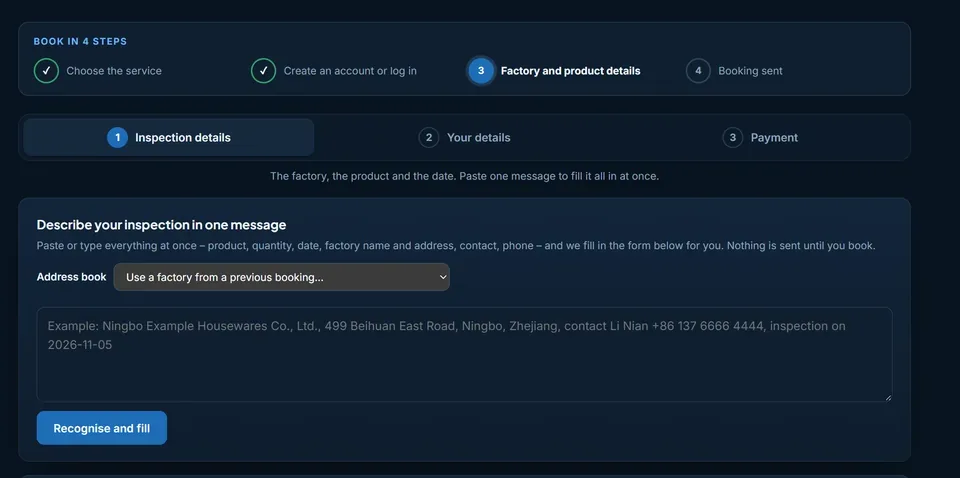
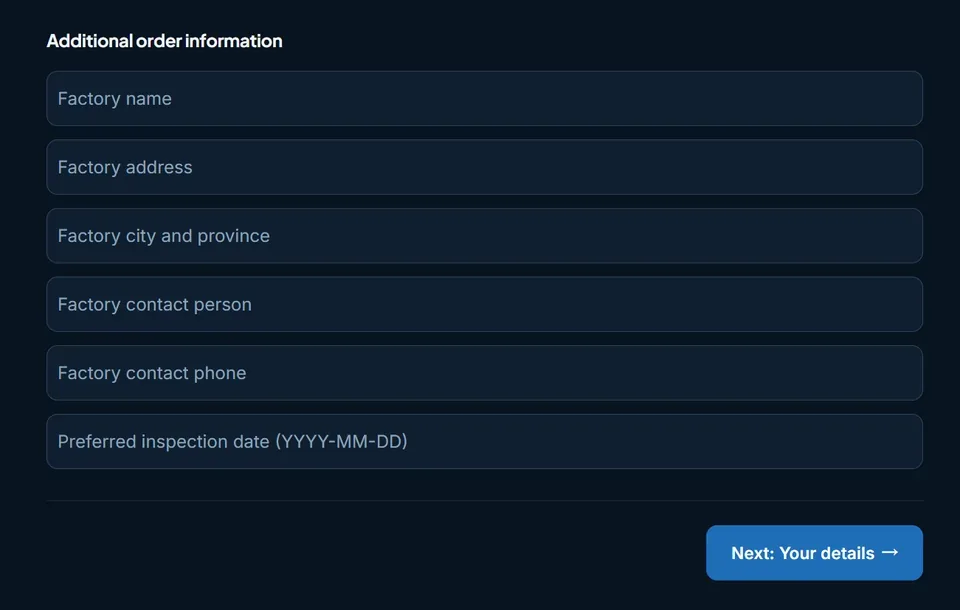
Booked this factory before? Choose it from the address book instead of typing it again. Then check the factory fields and your preferred inspection date. You can request any date from the next day (China time) up to twelve months ahead; we then confirm the actual date with the factory.
Under “Products and quantities” you enter each style and its quantity, and the sample size is calculated for you according to ISO 2859-1. The default plan — general inspection level II, AQL 2.5 for major and 4.0 for minor defects, and no critical defects accepted — can be changed with one click. How to adjust it is explained in our guide to setting your own sampling plan.
The second part of the form, “Your details”, needs only your name and country. A company VAT or tax ID, an invoice address and the option to receive the inspection videos and original photos are all optional.
Step 4: Choose How to Pay and Send the Booking
The last step shows the payment options. Pay with PayPal on PayPal's secure page and the payment is confirmed at once. Or choose bank transfer in USD: the bank details and an invoice for your accounts team are ready as soon as you book. If you hold prepaid inspector-days, the booking is paid from your balance, with no transfer at all, and goes straight to scheduling.
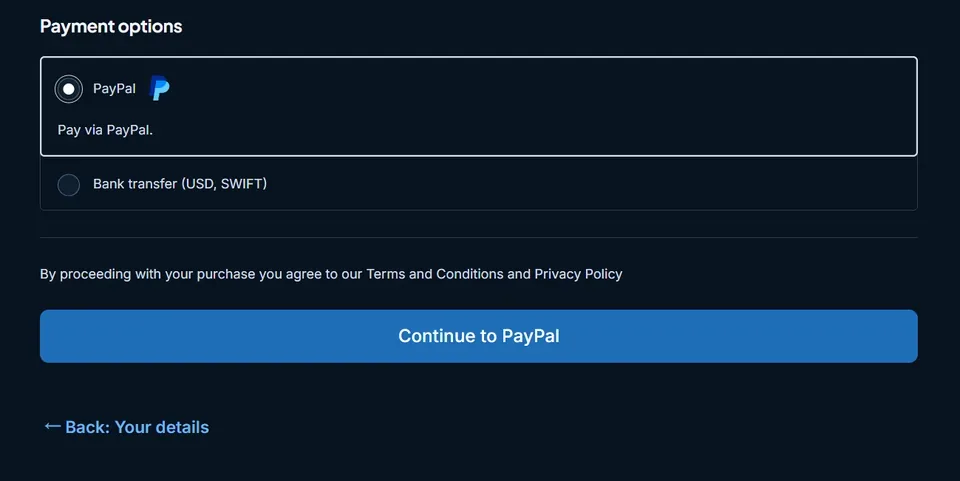
One safety rule is worth knowing before you pay anyone in China: SSTI never changes its bank details by email or chat. Pay only to the account shown in the portal and in our confirmation email. If anyone asks you to pay somewhere else, contact us before paying.
What Happens After You Book
- As soon as the payment arrives, we agree the inspection date with the factory and email you.
- On your booking page you can upload your checklist, drawings or approved-sample photos for the inspector to follow.
- After the inspection, the report appears on your booking page — usually the same day or the next morning — and you receive an email.
- If plans change, you can cancel free of charge up to one working day before the inspection date.
Payment, scheduling, report delivery and cancellations are explained in more detail in from booking to report in the client portal.
Booking by Email Still Works
If you prefer to send the details by email or WhatsApp, or the order is unusual — many factories, a very large lot, a product that needs special equipment — contact us and we will set the booking up with you. The portal simply removes the back-and-forth from the bookings that do not need it.
Ready to book your next inspection?
Book online in about three minutes. The client portal is available in English, Spanish, German, Italian, Arabic, Japanese and Korean.
Book an inspection