Sampling Plan
Setting Your Own Sampling Plan When You Book an Inspection
The sampling plan decides how much an inspection can tell you: how many pieces are checked, and how many defects are allowed before the lot fails. With most inspection companies it is agreed by email, often after the price. In SSTI's client portal it is part of the booking form. You enter your quantities, the sample size is calculated as you type, and every setting can be changed by you. This guide explains each setting and when to change it.
- The default plan and when to make it stricter or lighter
- How to book several styles and purchase orders in one booking
- How the number of inspector-days follows from your sample
The Default Plan, Calculated as You Type
Every booking starts with the plan most buyers use: ISO 2859-1, general inspection level II, AQL 2.5 for major defects and AQL 4.0 for minor defects, with no critical defects accepted (AQL 0). As soon as you enter an order quantity, the sample size appears next to that style, and the total sample size appears at the top. You do not need to look anything up in a table.
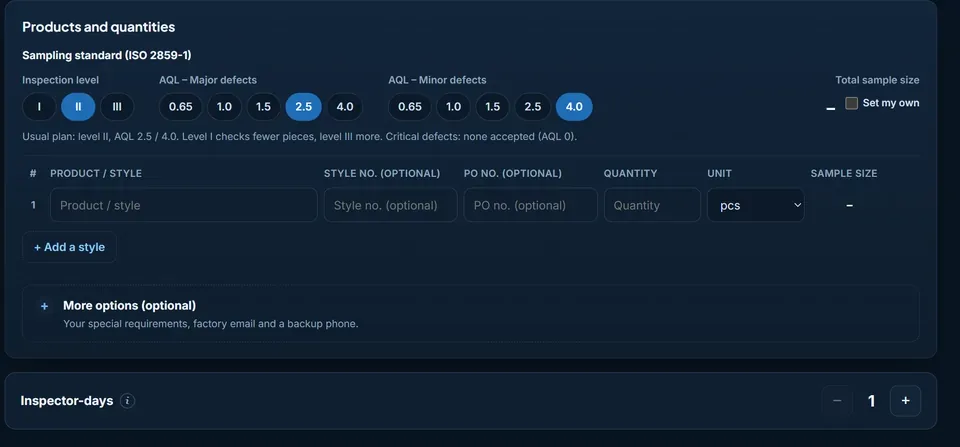
If you want to understand the method behind the numbers — lot size, code letters and accept and reject numbers — our AQL guide for importers explains it step by step, and the AQL calculator lets you try any quantity.
Inspection Level: I, II or III
The inspection level changes how many pieces are checked for the same order. Level I checks fewer pieces, level III more. For an order of 5,000 pieces, the difference looks like this:
| Inspection level | Sample size | AQL 2.5 (major): accept / reject | AQL 4.0 (minor): accept / reject |
|---|---|---|---|
| Level I | 80 pcs | 5 / 6 | 7 / 8 |
| Level II (default) | 200 pcs | 10 / 11 | 14 / 15 |
| Level III | 315 pcs | 14 / 15 | 21 / 22 |
Level II suits most orders. Level I can make sense for a repeat order from a supplier with a clean record on a simple, low-risk product. Level III is worth it for a new supplier, a product that has failed before, or goods where a defect reaching your customer is expensive. A larger sample does not make a bad lot better, but it makes it harder for a real problem to slip through by chance.
AQL for Major and Minor Defects
The AQL buttons set how strict the result is: 0.65, 1.0, 1.5, 2.5 or 4.0 for major defects and the same choices for minor defects. A lower number accepts fewer defects. Critical defects — those that make a product unsafe or illegal to sell — are never accepted, whatever you choose for the others. Which defect belongs in which class is explained in our guide to defect classification.
Setting Your Own Sample Size
Some buyers do not use the ISO tables at all, because their customer or a retail programme prescribes a fixed number of pieces. Tick “Set my own” and enter the number of pieces to check. If the sample would be as large as the lot, the inspection simply covers the whole lot, which is a 100% inspection.
Several Styles and Purchase Orders
Add a row for each style, with an optional style number and PO number. Up to ten styles are entered one by one. You can choose to sample each style separately, so that each style gets its own result, or all styles together, in which case the sample is shared between the styles in proportion to their quantities. Separate sampling gives a clearer picture of each style but needs more pieces in total. Sampling together is efficient for similar items made on the same line. If your order has more than ten styles, enter the number of styles and one total quantity, and upload the style list after booking. Several PO numbers can be entered in one field, separated by commas.
How Inspector-Days Are Worked Out
One inspector checks up to 800 sample pieces and up to ten styles in a day. When your quantities need more than that, the form adds inspector-days automatically, tells you why, and updates the price at once. You can also add days yourself, for example when you want extra tests. A single booking can have up to 60 inspector-days; anything larger is split into two bookings.
After booking, your booking page shows the sampling plan in full: the sample size and the accept and reject numbers for each defect class. When the report arrives, you can check the result against those numbers yourself.
Tell the Inspector What Matters
Under “More options” there is space for your special requirements: compare the colour with the approved sample, look for scratches on the lid, drop-test three cartons, or a problem you had with this factory before. You can also add the factory's email and a backup phone or WeChat contact. A full checklist, drawings and approved-sample photos can be uploaded on your booking page after you book. What a useful checklist contains is covered in how to prepare an inspection checklist.
Set your sampling plan and book
The sample size, accept and reject numbers and inspector-days are calculated while you fill in the form.
Book an inspection